
You open Find My Iphone and Ipad. You tap a device. Then you see the word Live under the location.
What does that actually mean?
Is someone tracking you in real time? Is your iPhone actively sending data every second? Or is it just another Apple status label?
If you are searching for what does Live mean on Find My Iphone, this complete iPhone and iPad guide explains everything clearly. By the end, you will know how Live location works, when it appears, why it disappears, and how to control it.
One small setting determines whether you see Live or not. Most users never check it.
The Problem: Confusion Around Live Location Status
When using Find My Iphone, you may see different location labels:
- Live
- Now
- 5 minutes ago
- Yesterday
Many users assume “Live” means constant tracking. Others think it indicates stalking or hidden monitoring.
The confusion leads to common concerns:
- Is someone tracking me continuously?
- Why does Live appear sometimes but not always?
- Does Live drain battery faster?
- Can I disable it?
Let’s break down the real explanation.
The Solution: What “Live” Actually Means on Find My Iphone
When you see Live in Find My on an iPhone or iPad, it means:
The device’s location is updating in real time while you are actively viewing it.
That’s it.
It does not mean hidden tracking. It does not mean someone is spying. It simply shows that the location is refreshing continuously instead of displaying a static last-known position.
The feature works when:
- The device is powered on
- It has internet access
- Location Services are enabled
- The battery is not critically low
Now let’s go deeper.
What “Live” Actually Means on Find My Iphone
How Live Location Works
Apple’s Find My uses GPS, WiFi, Bluetooth, and cellular signals to determine location. When you open a device in the app and it says “Live,” the system is actively pulling updated coordinates.
Instead of showing:
“Updated 2 minutes ago”
It streams location changes as they happen.
This is especially useful when:
- Tracking a moving family member
- Locating a lost device in motion
- Monitoring a delivery or travel situation
The real-time refresh stops once you close the device view or lose connection.
When Does “Live” Appear?
You typically see Live when:
- You are actively watching someone’s location
- The person is moving
- The device has strong internet connection
If the device becomes stationary, the label may switch to “Now” instead.
If internet drops, it changes to a time stamp such as “5m ago.”
Does Live Mean Someone Is Tracking Me?
No.
Find My only shares location if:
- You enabled location sharing
- You approved sharing with a specific contact
- You are signed into the same Apple ID
Apple requires permission for all location sharing. No one can secretly activate Live tracking without your consent.
Location sharing settings are controlled inside your Apple ID settings and Find My preferences.
Does Live Drain Battery?
Real-time updates use slightly more battery than static location checks. However, Apple optimizes background processes efficiently.
Battery impact depends on:
- Signal strength
- GPS usage
- Screen-on time
- Active apps
In normal conditions, Live tracking does not cause significant battery drain.
How to Turn Off Live Location Sharing
If you want to stop Live updates:
- Open Settings
- Tap your Apple ID name
- Select Find My
- Tap Share My Location
- Toggle it off
You can also stop sharing with specific contacts inside the Find My app.
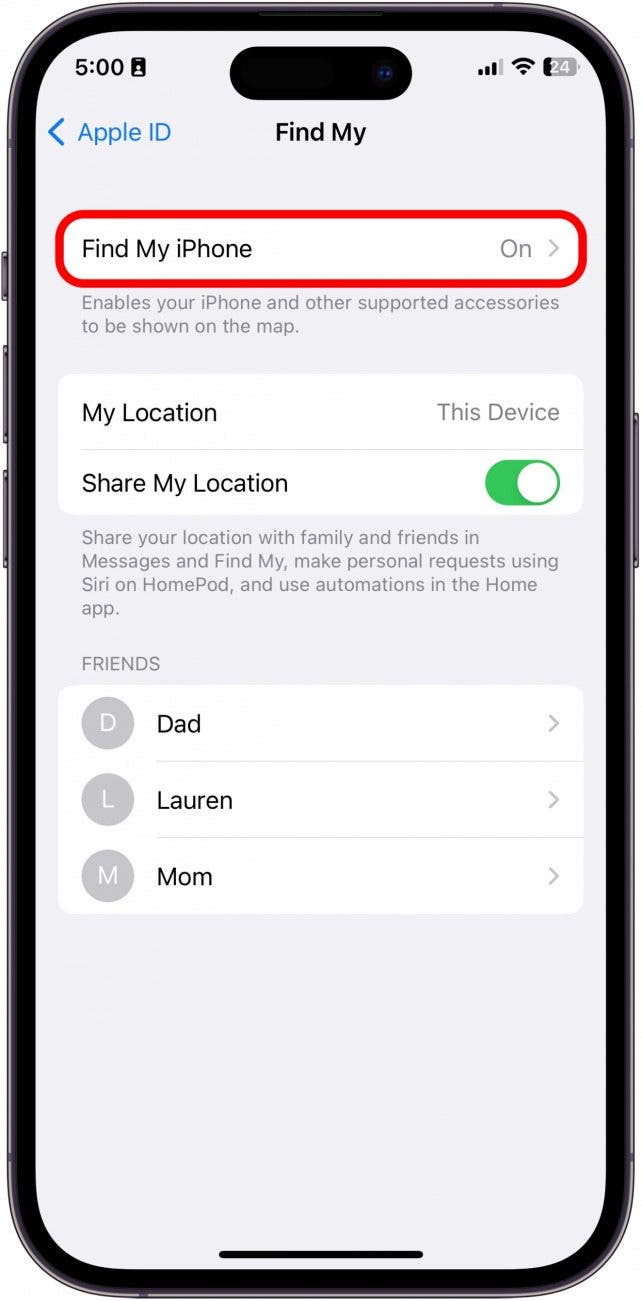
This prevents others from seeing your location, whether Live or static.
Live vs Now: What’s the Difference?
Here is a simple comparison:
Live
- Real-time updating
- Device is actively moving
- You are viewing it
Now
- Device location is current
- Not actively refreshing every second
- Device may be stationary
Both indicate the device is online. Live just updates continuously.
Common Mistakes to Avoid
1. Assuming Live Means Hacking
Live status does not indicate unauthorized access. Location sharing requires permission.
2. Forgetting Internet Dependency
Without WiFi or cellular data, Live will not function. Users often think the feature is broken when it is simply offline.
3. Ignoring Location Services Settings
If Location Services are disabled, Find My cannot update accurately.
To check:
- Settings
- Privacy & Security
- Location Services
- Ensure Find My is enabled
4. Confusing Airplane Mode With Disabled Sharing
Airplane mode stops internet access. It does not permanently disable location sharing settings.
FAQ: What Does Live Mean on Find My?
Does Live mean real-time tracking?
Yes. It means the device location is updating continuously while you view it.
Why does Live disappear?
It disappears when:
- The device stops moving
- Internet connection drops
- You close the device view
Can someone track me without permission?
No. Apple requires explicit approval for location sharing.
Why does it say 10 minutes ago instead of Live?
That means the device is offline or not updating in real time.
Is Live available on both iPhone and iPad?
Yes. Any supported Apple device signed into Find My can show Live status.
Conclusion
If you were wondering what does Live mean on Find My Iphone or Ipad, the answer is straightforward.
Live indicates real-time location updates while you are actively viewing a device.
It does not mean secret tracking. It does not mean surveillance. It simply reflects active GPS refresh.
To control it:
- Manage location sharing settings
- Keep internet enabled
- Review privacy preferences
Understanding how Find My Iphone works removes unnecessary worry and gives you full control over your location visibility.
If you want, I can also create a separate technical guide focused on privacy optimization for Apple users in the US, UK, Canada, and Australia. Thanks for reading on tipandroid tips.